
Plenty of employment lawyers still treat AI as a toy their juniors play with after hours. Meanwhile, the firm across the street is turning around EEOC position statements before lunch.
So which AI tools should every employment lawyer know about? Six of them do the heavy lifting: CoCounsel for research and litigation support, Relativity aiR and Everlaw for wage-and-hour discovery, Spellbook and Paxton AI for drafting and contract review, and ComplianceHR for multistate policy work. Lexis+ AI, Bloomberg Law’s AI tools and a carefully configured Claude account make up the bench.
Microsoft 365 Copilot and Sonix transcription sit on the edges, helping with the admin and the recordings. None of these replaces judgement, and every one of them can embarrass you in front of a judge if you stop checking its work.
The pressure is real. State legislatures keep amending leave laws, pay transparency rules and non-compete restrictions faster than any associate can track. Clients want flat fees. Opposing counsel is already using this stuff.
Why sit it out?
AI Tools for Legal Research and Litigation
Research is where most lawyers first get burnt by AI, usually through a general chatbot inventing a case that sounds perfect. Mata v. Avianca in 2023 made that lesson very public and it still stings. Legal-specific platforms reduce the risk because they ground answers in real case law. They don’t remove it.
In a typical employment matter, these research and litigation tools earn their fee on a few kinds of work:
- Pulling circuit splits on joint-employer liability or FLSA exemptions in minutes
- Summarising thousands of timekeeping records and Slack messages in a collective action
- Building deposition outlines from the personnel file and prior testimony
- Drafting first-pass EEOC charge responses from the client’s internal investigation notes
CoCounsel
Thomson Reuters bought Casetext and folded CoCounsel into its Westlaw world, so its research sits on real authority, not internet scraps. Reviewers say it can bring EEOC response drafting down from several hours to under 45 minutes. I believe the number for a clean file. For a messy discrimination case with three supervisors telling three different stories? Less so. Its data protection terms are strict, and that matters when you are uploading medical leave records.
Blue J L&E
Blue J earned its reputation in Canada predicting outcomes on worker classification and reasonable notice periods, running “what-if” scenarios with machine learning. Useful for case assessment, very persuasive to clients who like numbers. One caution, though. Blue J has shifted much of its energy towards tax, so confirm what the employment module currently offers before you build a practice around it. Canadian lawyers can cross-check its predictions against the free CanLII database, which publishes its own generative AI guidelines on transparency and human review.
Relativity aiR and Everlaw
Wage-and-hour class actions drown people in data. Punch records, badge swipes, emails, Teams chats. Relativity aiR and Everlaw both use generative AI to prioritise review, so thousands of documents get triaged in days, not weeks. Defence teams love it for privilege review. Plaintiff firms love it for finding the one manager email that admits to off-the-clock work. Same tool, different hunger.
(Small digression: pair either with Sonix for deposition and interview transcription and you will stop paying a court reporter for rough drafts you only skim anyway.)
AI Tools for Employment Contracts and Agreements
Transactional employment work is repetitive in a way that quietly kills profit. Offer letters, severance agreements, restrictive covenants, arbitration clauses. Over and over, with state tweaks.
Spellbook
Spellbook’s contract review platform lives inside Microsoft Word, which is why lawyers actually use it. It redlines against your playbook, flags ambiguous severance terms and spots non-compete clauses that will not survive in California, Minnesota or other states that have banned them. Its Associate suite goes further, running multi-document projects on its own, like checking an entire acquisition’s worth of executive agreements for change-of-control triggers.
Paxton AI
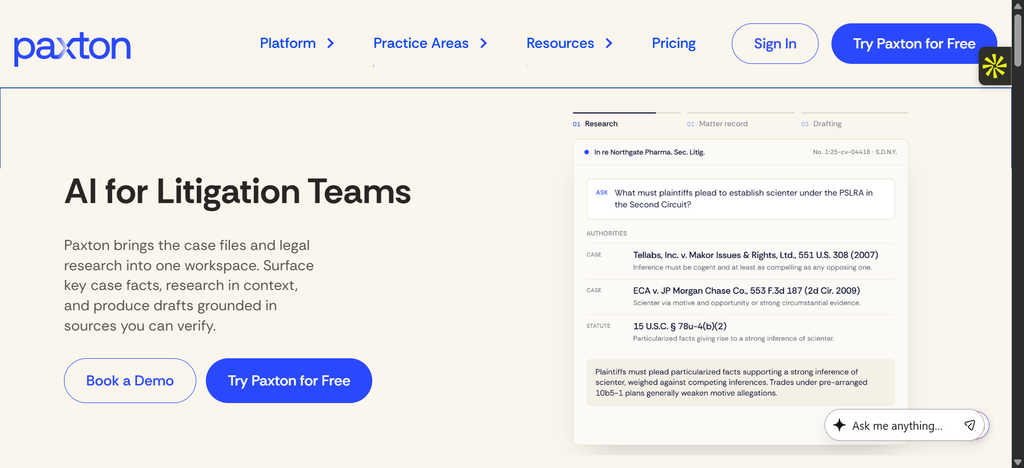
Paxton is the solo practitioner’s friend. It drafts demand letters, EEOC responses and severance agreements, and it can handle federal and state research in plain language. Users and reviewers claim drafting time drops by 50 to 70 percent. That figure comes from Paxton’s own market, so treat it as a ceiling, not a promise. Still, for a two-attorney shop with no paralegal, Paxton AI changes the maths of flat-fee work.
Claude for Legal
Anthropic’s Claude is strong at long policy documents, and on enterprise terms your data is not used for model training. That makes it safer than a free ChatGPT account for reading a 90-page handbook. Do not mistake it for a research database, though. Claude does not carry Westlaw-grade citations, and you should never ask it for case law without verifying every single cite. The same rule applies to Gemini and Copilot for Microsoft 365. They are good writing assistants and poor legal authorities.
AI Tools for Compliance and Policy Management
ComplianceHR
ComplianceHR is Littler-backed, and that is the whole selling point. Its 50-state handbook templates and classification tools rest on content written by employment lawyers, not on a language model’s best guess. When Colorado or Illinois amends a leave statute, the update comes from people who read the bill.
Lexis+ AI
LexisNexis built Lexis+ AI on its Practical Guidance content, so you get conversational search across employment statutes and state surveys with linked citations. It is strong for quick multistate comparisons on topics like final paycheck timing.
Bloomberg Law AI

Bloomberg Law’s AI assistant summarises dockets and Labor Relations reporting well. Firms already paying for Bloomberg should try it before buying another subscription.
| Tool | Main Job | Best Fit | Watch Out For |
|---|---|---|---|
| CoCounsel | Research, doc review | Mid-size and large firms | Cost |
| Relativity aiR / Everlaw | E-discovery | Class action teams | Setup and training time |
| Spellbook | Contract review in Word | Transactional employment lawyers | Needs a good playbook |
| Paxton AI | Drafting and research | Solos, small firms | Verify citations |
| ComplianceHR | Multistate policies | In-house, HR teams | Narrow scope |
| Claude / Copilot / Gemini | General drafting | Everyone | No reliable case law |
How Do You Choose the Right AI Tool?

Demos look perfect. Your actual files will not. Run a pilot on a closed matter you know inside out, and score the tool honestly.
Accuracy and Citations
Ask whether the tool shows its sources and whether those sources are primary law. Look at how Spellbook connects to legal data sources for a sense of what grounded retrieval looks like. A tool that cannot show you where an answer came from should not be drafting anything that leaves your office.
Data Security
Read the vendor’s terms. Is client data used for training? Where is it stored? Who can access it? ABA Formal Opinion 512 and Model Rule 1.6 put the duty of confidentiality on you, not the vendor. Ask for SOC 2 reports, and increasingly, ask whether the vendor is certified under ISO/IEC 42001, the AI management system standard published in late 2023.
Workflow Integration
If it does not sit inside Word, Outlook, Teams or your document management system, your attorneys will stop opening it by the second week. I have watched it happen at three firms.
What Are the Risks of AI in Employment Law?

Hallucinated citations get the headlines. The deeper wahala is bias and regulation, because employment lawyers also advise clients who deploy AI in hiring.
Your clients’ hiring tools now carry legal exposure of their own:
- New York City’s automated employment decision tools law (Local Law 144) requires independent bias audits and candidate notices, enforced since July 2023.
- The EU treats recruitment and worker-management AI as high-risk, and the AI Act’s statutory text sets out heavy documentation and oversight duties.
- The EU Pay Transparency Directive, due for transposition by June 2026, will expose any pay-setting algorithm that reproduces a gender gap.
Privacy sits underneath all of it. Uploading an employee’s disability accommodation file into a consumer chatbot is a breach waiting to happen.
Keep Human Oversight in Every AI Workflow

Treat every output as a first-pass draft from a fast, overconfident junior. The NIST AI Risk Management Framework gives you a sensible structure (Govern, Map, Measure, Manage) to write a firm policy around. Name a reviewing attorney for every AI-assisted document. Log what tool touched what file. Check every cite against the source. Boring, yes. Also the difference between a sanction and a good night’s sleep.
Should Plaintiff and Defense Lawyers Use Different Tools?
Mostly the same tools, used with different aims. Plaintiff firms lean on Paxton, Sonix and intake chatbots to screen discrimination complaints and draft demand letters cheaply, because volume pays the rent. Defence teams and in-house counsel lean on ComplianceHR, Relativity and CoCounsel, because prevention and document-heavy litigation are where their budgets go. If anything, plaintiff lawyers should pick tools with stronger privacy controls, since their clients are individuals with far more personal exposure.
FAQ
Is ChatGPT safe for employment law work? Only for non-confidential drafting, like rewriting a client alert. Never paste client data into a consumer account, and never trust its case citations.
Which AI tool is best for a solo employment lawyer? Paxton AI offers the most value per dollar for drafting and research, with Spellbook added if you do much contract review.
Can AI write an employee handbook? It can draft one. ComplianceHR or Lexis+ AI will get you closer to compliant state language, but an attorney must still review it against current regulations.
Conclusion
The lawyers getting value from AI are the ones who picked a narrow problem, chose a legal-specific tool, and kept checking its work. Start with one pilot on one closed file. Measure the hours honestly, read the vendor’s data terms twice, and keep a human name on every output. Then expand.